
Direct download
Your next journey is ready.
Download Minutes & Maps version 1.0.8 for Windows or macOS and turn your next focused minute into forward motion.Version 1.0.8
Windows 10/11 x64 Approximately 230 MB
Download for Windows Microsoft Store release coming soon.Version 1.0.8
Apple Silicon and Intel Approximately 352 MB
Download for macOS Mac App Store release coming soon.What’s new in version 1.0.8
- Your starter city, companion, stamp and selfie now correctly follow your account-first onboarding choices, including after cloud sync and relaunch.
- Returning accounts keep their existing progress, and guest progress still migrates safely when you create an account.
- You can now edit your display name from Profile and keep it across cloud sync, sign-out and relaunch.
Windows installation guide
Install from the official download
Windows may display “Windows protected your PC” because the direct installer is not yet code-signed. If you downloaded the installer from this official Minutes & Maps page and the filename is Minutes-and-Maps-1.0.8-x64-Setup.exe:
- Select More info.
- Confirm the displayed application filename.
- Select Run anyway.
- Continue through the installer and select Install.
Do not run the file if it came from another website or has a different filename.
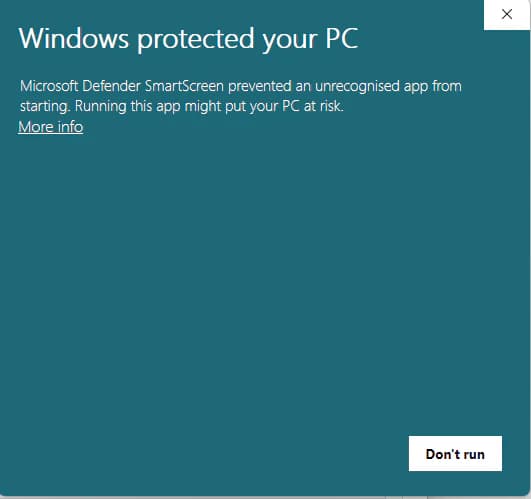
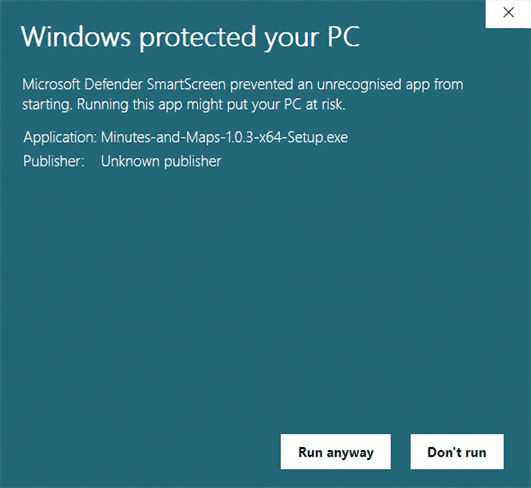
Minutes-and-Maps-1.0.8-x64-Setup.exe.This historical screenshot shows the previous v1.0.3 filename. For v1.0.8, confirm Minutes-and-Maps-1.0.8-x64-Setup.exe. On a small screen, scroll the image horizontally to inspect it.Open full-size imageWhat you’ll be downloading
Minutes & Maps: Focus Adventure is a cozy desktop focus experience. Choose a destination, begin a session and turn each focused minute into one virtual kilometre of progress.
- Destination-based journeys across a virtual world map
- Focus sessions that power travel
- Companions, vehicles, city stamps, postcards and a growing passport
- Optional friends travelling on the shared virtual map
macOS installation note
Need help installing? Visit the support page.